Display Interfaces: LVDS vs MIPI vs eDP vs HDMI
A technical comparison of LVDS, MIPI DSI, eDP, and HDMI display interfaces for embedded and industrial applications, including performance, compatibility, cost, and design considerations.
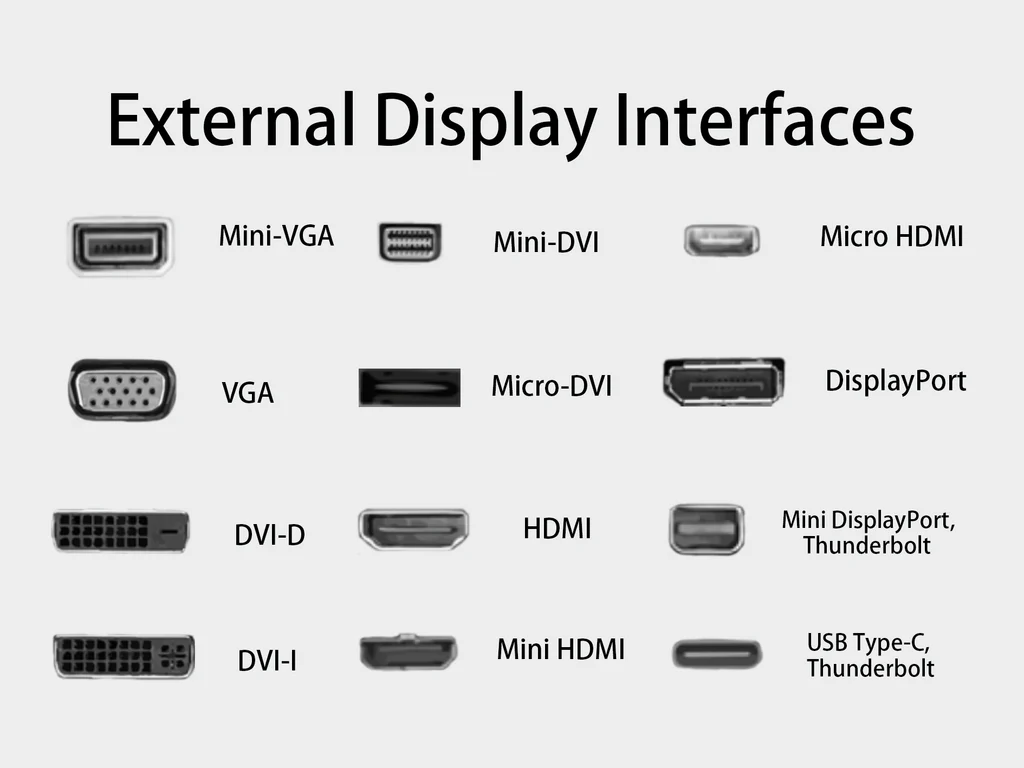
Choosing the right display interface is critical in embedded and industrial system design.
The interface affects image quality, refresh rate, power consumption, cable length, EMI performance, and overall BOM cost.
This guide compares LVDS, MIPI DSI, eDP, and HDMI from an engineering perspective to help you select the best option.
For readers who want a broader overview of different TFT interface standards, you can also explore this detailed collection of TFT display interface guides.
1. LVDS (Low-Voltage Differential Signaling)
Overview:
- Long-standing interface for industrial displays.
- Transmits data using differential pairs, reducing EMI and enabling longer cable runs.
Strengths:
- Mature, widely supported in industrial SBCs and HMIs.
- Robust over longer distances (up to 10m with proper cabling).
- Works well in high-noise environments.
Limitations:
- Fixed data mapping; less flexible for resolution scaling.
- Higher pin count compared to newer serial interfaces.
- Not ideal for ultra-high resolutions (>1080p) without dual/quad channel.
Best For:
Factory automation panels, outdoor kiosks, medical monitors.
2. MIPI DSI (Mobile Industry Processor Interface - Display Serial Interface)
Overview:
- Designed for smartphones and tablets; now used in compact embedded systems.
- High-speed serial lanes with low pin count.
Strengths:
- Very low power consumption.
- High bandwidth for high-resolution displays (up to 4K with 4 lanes).
- Slim FPC cable designs possible.
Limitations:
- Limited cable length (usually <30cm).
- Sensitive to EMI; not suitable for noisy industrial environments without shielding.
- Less mature driver ecosystem in some industrial SBCs.
Best For:
Compact HMIs, portable devices, low-power IoT displays.
3. eDP (Embedded DisplayPort)
Overview:
- A variation of DisplayPort for internal connections.
- Supports high resolution, high refresh rate, and adaptive sync.
Strengths:
- Scales up to 8K resolutions.
- Lower EMI than HDMI due to packet-based transmission.
- Can carry audio and auxiliary data.
Limitations:
- Shorter cable length than LVDS (typically <3m).
- Less common in older industrial platforms.
Best For:
High-performance industrial PCs, AI vision systems, advanced medical displays.
4. HDMI (High-Definition Multimedia Interface)
Overview:
- Widely used consumer standard; supports audio and video in a single cable.
Strengths:
- Universal compatibility with TVs, monitors, projectors.
- Supports hot-plug detection and HDCP content protection.
- Up to 8K resolution with HDMI 2.1.
Limitations:
- Higher power consumption compared to LVDS/MIPI.
- Not optimized for internal display connections (bulkier connectors).
- EMI shielding required for industrial environments.
Best For:
Prototyping, external displays, digital signage.
5. Comparison Table
Before looking at the direct comparison, it’s also useful to understand how resolution and aspect ratio influence interface selection, since different standards scale differently with pixel density.
For a deeper dive, check this guide on resolution and aspect ratio in TFT displays.
| Feature | LVDS | MIPI DSI | eDP | HDMI |
|---|---|---|---|---|
| Max Cable Length | 10m+ | <0.3m | <3m | 10m+ |
| Resolution Support | Up to 1080p (dual) | Up to 4K | Up to 8K | Up to 8K |
| Power Consumption | Medium | Low | Medium | High |
| EMI Resistance | High | Low | Medium-High | Medium |
| Cost | Low | Low-Medium | Medium | Low-Medium |
| Industrial Use | Excellent | Limited | Good | Limited |
6. Application Recommendations
Use LVDS when:
- You need long cable runs.
- The environment has high EMI.
- You need stable long-term industrial supply.
Use MIPI DSI when:
- Compact form factor and low power are priorities.
- Cable length is short.
- Device is battery powered.
Use eDP when:
- You need ultra-high resolution and refresh rate.
- Design allows short, shielded cables.
- Platform supports DisplayPort protocols.
Use HDMI when:
- The display is external and user-replaceable.
- You need consumer-grade compatibility.
- Prototyping with widely available monitors.
Additional Resource
For readers who want a broader overview of how these interfaces are used in embedded systems, you can also check this Google page on display interfaces.
Final Thoughts
No single display interface is perfect for every embedded project.
LVDS remains the king for rugged, long-distance industrial applications, while MIPI DSI dominates in portable, battery-powered devices. eDP is ideal for high-performance, short-distance designs, and HDMI offers unmatched compatibility for consumer-facing products.
Choosing the right interface early in the design phase avoids costly redesigns and ensures optimal performance for the product’s lifetime.
Engineering Validation Notes
Interface selection should be verified with the exact processor, display panel, cable, connector, firmware, and enclosure used in production. A short development cable on an evaluation board does not represent a routed harness inside a noisy industrial product. LVDS and eDP need controlled impedance and pair matching. MIPI DSI needs short, disciplined FPC routing and correct initialization commands. HDMI needs connector retention, shielding, and careful EMC review if it is used inside equipment.
Power sequencing is another common source of display problems. The panel logic supply, reset line, interface enable, backlight enable, and touch controller should be reviewed as a sequence rather than independent signals. Test cold boot, warm restart, sleep and resume, brownout recovery, and repeated power cycling. Many display issues reported as software bugs are actually timing, cable, or grounding problems.
From a lifecycle perspective, choose an interface that the product team can support for the expected production window. A technically elegant interface is a poor choice if the operating system, bootloader, or supplier documentation cannot support the exact display module over multiple hardware revisions.
Documentation to Freeze Before Production
Before production release, freeze the panel timing, connector pinout, cable drawing, power sequence, backlight control method, and software configuration in one controlled package. This is especially important when the same product may later use a replacement panel. If the original integration knowledge lives only in a supplier email or a developer’s local device tree file, future maintenance becomes unnecessarily risky.
For LVDS, record the mapping format, bit depth, pixel clock, sync polarity, and dual-channel arrangement if used. For MIPI DSI, preserve the initialization command sequence, lane count, data rate, reset timing, and sleep or resume commands. For eDP, document lane count, link rate, AUX behavior, backlight control, and firmware assumptions. For HDMI, document cable requirements, supported modes, hot-plug behavior, and any EDID constraints.
This documentation does not need to be complicated, but it must be specific. A display interface is part of the product architecture, and treating it as a replaceable cable choice often leads to late failures.
During architecture review, compare SPI, parallel RGB, and MIPI DSI for small TFTs before defaulting to the processor’s most familiar port. Then document the pixel-clock, bandwidth, and lane-count calculation, the LCD rail and backlight power sequence, any display protocol bridge IC requirements, and the FPC, FFC, connector, and cable constraints. These records make later panel or processor substitutions much less speculative.
FAQ
Which display interface is best for industrial equipment?
There is no universal best interface. LVDS is often practical for robust industrial systems and moderate cable lengths. MIPI DSI is efficient for compact products. eDP is strong for high-resolution embedded displays. HDMI is useful when compatibility or external replacement matters.
Why should the interface be chosen early?
The interface affects processor selection, PCB layout, cable length, connector location, EMI behavior, firmware, power sequencing, and enclosure design. Choosing it late can force mechanical or electrical redesign.
Is MIPI DSI suitable for long cables?
Usually no. MIPI DSI is designed for short internal connections. If the display must be far from the processor, LVDS or another more suitable interface may be easier to validate.
What should be documented for a display interface?
Document timing, pinout, mapping, lane count, cable drawing, reset sequence, power sequence, backlight control, firmware settings, and approved panel revision. This protects future maintenance and replacement work.