What 178-Degree Viewing Angle Really Means for IPS Displays
Learn what a 178-degree IPS viewing angle really measures, why CR≥10 is not a color guarantee, and how to test off-axis display performance.
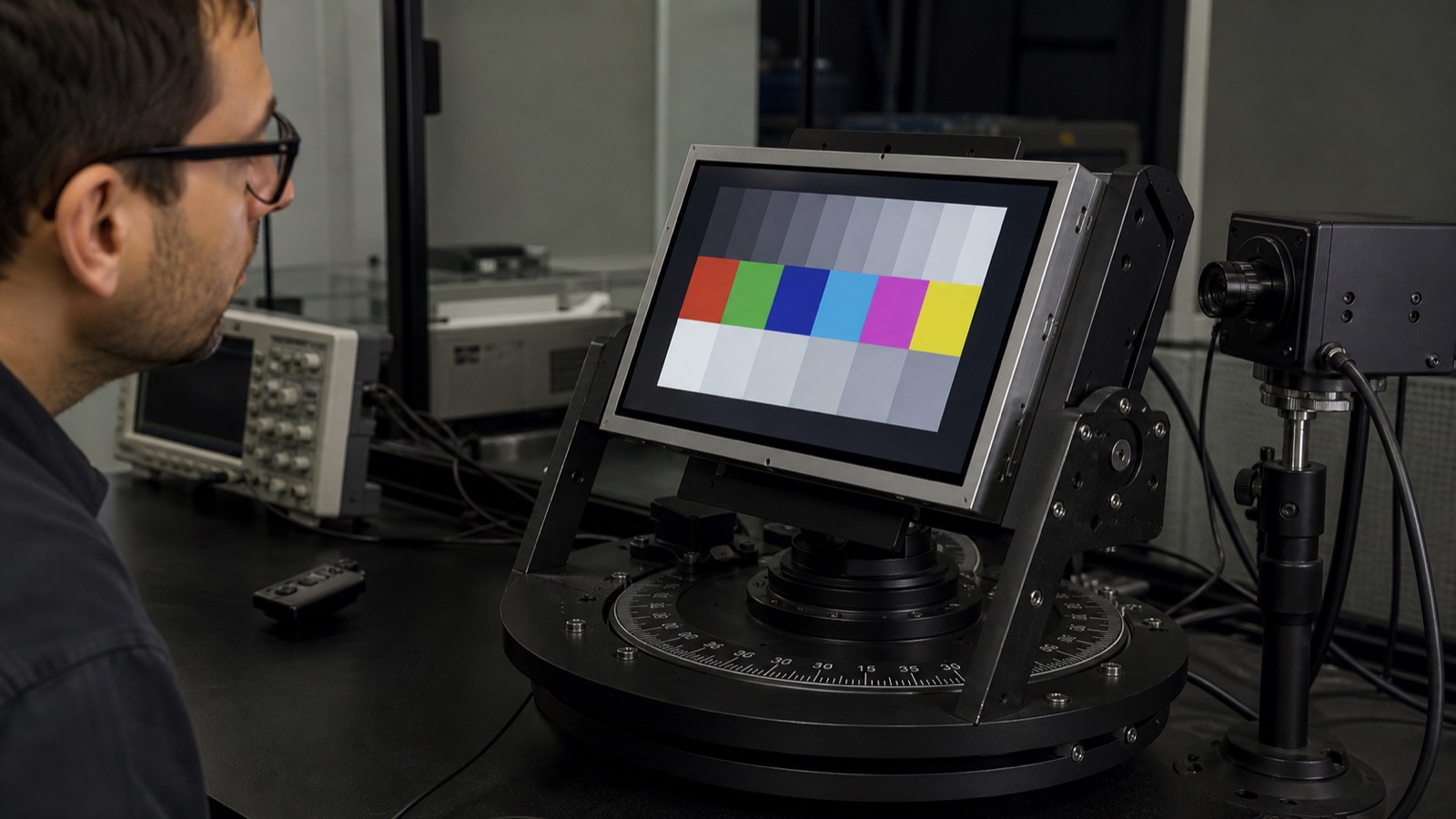
“178-degree viewing angle” sounds almost unlimited. Read literally, it suggests an IPS display should look the same from nearly edge-on as it does from the front. Put a real panel on a bench and the gap between that promise and what your eyes see becomes obvious: the image is still present, but brightness falls, blacks lift, reflections increase, and some colors or gray levels shift.
The specification is not necessarily wrong. It is answering a narrower question than most buyers assume.
For an embedded or industrial product, the useful question is not, “Can an instrument still detect an image at 89 degrees?” It is, “Can the operator read the actual interface from every position the product allows?” Those are different acceptance tests.
How 178 degrees is normally defined
Display datasheets commonly state viewing angle as four directional limits: left, right, up, and down. A panel described as 178° horizontal and 178° vertical is usually claiming approximately 89° in each direction from the surface normal:
Horizontal viewing range ≈ 89° left + 89° right = 178°
Vertical viewing range   ≈ 89° up   + 89° down  = 178°
Zero degrees is the straight-on position. Ninety degrees would place the observer along the plane of the glass, where the visible projected area approaches zero. The headline figure is therefore the sum of two directional limits, not a 178° rotation away from the front.
The next detail matters more: many TFT LCD specifications define each limit at contrast ratio ≥10:1. The test moves the detector away from normal until measured white divided by measured black falls to the threshold. If the ratio remains at or above 10:1, that angle can be included in the specification.
That method proves a measurable distinction between white and black. It does not prove accurate color, stable gamma, unchanged luminance, legible fine text, or acceptable reflection at the same angle.
CR≥10 is a boundary, not a quality grade
A 10:1 contrast ratio can be enough for an instrument to recognize the test pattern. It is not a strong target for a production HMI. Dark gray controls may merge into black, thin text may lose clarity, and warning colors may no longer look like the approved front-view sample.
Consider a simplified example:
| Viewing position | White luminance | Black luminance | Contrast ratio |
|---|---|---|---|
| Straight on | 600 cd/m² | 0.6 cd/m² | 1000:1 |
| Far off-axis | 120 cd/m² | 10 cd/m² | 12:1 |
The off-axis result still exceeds a CR≥10 limit, so it may count toward the viewing-angle claim. Yet white output has dropped sharply and black has become visibly gray. A low-contrast interface will not look normal.
This is why two panels with the same 178° label can produce noticeably different off-axis images. One may retain neutral grays and readable colors over a broad cone; another may cross the 10:1 boundary at a similar angle while its gamma and color have already drifted.
Viewing angle is measured in controlled conditions
A complete optical specification should identify the test conditions. Typical items include:
- Ambient temperature, often near 25°C.
- Dark-room or controlled-light measurement.
- Backlight current and warm-up time.
- Measurement point, usually the screen center.
- Detector geometry and distance.
- Contrast threshold used to define the angle.
- Panel orientation and angular coordinate system.
An official Densitron TFT module specification, for example, states a CR≥10 viewing-angle condition together with a dark-room measurement, 25±2°C ambient temperature, and a defined warm-up period. That is the level of context engineers should expect when reviewing a panel number.
If the supplier table gives only “178°” without a contrast threshold or test note, ask for the optical measurement definition. The workflow for an industrial LCD datasheet review explains how to separate typical marketing values from controlled production limits.
Why IPS looks better off-axis without looking identical
In-plane switching keeps the liquid-crystal rotation primarily within the plane of the panel. Compared with conventional TN structures, this generally reduces the severe inversion and color changes that appear when the panel is viewed away from its preferred direction.
That advantage is real, but “wide viewing angle” does not remove all angular effects. An IPS module can still show:
- Lower luminance at steep angles.
- Raised black level or the familiar off-axis IPS glow.
- Gamma shift, especially in dark tones.
- White-point or color-coordinate movement.
- Different behavior along horizontal, vertical, and diagonal directions.
- More visible reflections from the cover lens.
- Reduced apparent sharpness because the screen is strongly foreshortened.
Panel construction, compensation films, polarizers, backlight design, cell gap, and optical stack all affect the result. “IPS” describes a display mode, not one universal performance curve.
The practical differences among IPS, TN, and VA viewing performance should therefore be checked on the exact module rather than inferred from technology names alone.
Color shift and gamma shift matter before CR fails
Contrast ratio measures white and black. Most interfaces contain neither pure white nor pure black across the whole screen. They use grays, brand colors, warning states, charts, photographs, and anti-aliased text.
Gamma describes how code values between black and white become luminance. When gamma changes with viewing angle, two adjacent gray levels may move closer together or farther apart even while the headline white-to-black contrast remains above 10:1. Dark UI elements are particularly sensitive because small changes near black can hide borders, trends, and disabled states.
Color can move for similar reasons. A red alarm may remain visibly red but no longer match the approved hue or brightness. Whether that matters depends on the product:
- A basic thermostat mainly needs readable labels and state separation.
- A medical or inspection display may need stable grayscale and color discrimination.
- A public terminal needs consistent appearance for users of different heights.
- A machine HMI may need an alarm color to remain unambiguous from the side.
A visual check should include the real interface, not just a white screen or a saturated demo image.
The product geometry defines the useful viewing cone
Most users never look at a panel from 89 degrees. The important angles come from installation geometry.
For a wall control, include short and tall users standing at normal reach. For a factory panel, include an operator beside the machine, a technician crouching during service, and someone reading an alarm while walking past. For a vehicle or outdoor terminal, include the seating position, mounting tilt, sun direction, and polarized sunglasses.
A simple geometry review can turn vague language into a requirement:
| Product situation | Useful angle to validate |
|---|---|
| Eye-level fixed HMI | Normal operator range plus service position |
| Low-mounted machine panel | Strong upward viewing angle |
| Wall-mounted control | Vertical range for different user heights |
| Shared medical cart | Horizontal and vertical movement around the cart |
| Portrait kiosk | Angles after rotating the panel from its native orientation |
| Outdoor equipment | Expected sun, reflection, and sunglasses combinations |
If every user remains within ±30°, performance at 80° may have little value. If a safety alarm must be read from across the side of a machine, the system needs a specific off-axis readability requirement—not merely “IPS, 178°.”
Landscape and portrait orientation can behave differently
Rotating a display changes which physical direction becomes up, down, left, and right. That matters when optical performance is not perfectly symmetrical, and it also changes the relationship between the LCD polarizer and polarized sunglasses.
Before committing to portrait use:
- Confirm the datasheet coordinate system and native panel orientation.
- Rotate the real module with production firmware and UI.
- Check all four directions and both diagonals.
- Test common polarized sunglasses at several head rotations.
- Repeat the check through the final cover glass and touch sensor.
Do not assume the horizontal 178° figure remains the most relevant axis after the mechanical design rotates the module.
Cover glass and touch can reduce practical visibility
Viewing-angle measurements in a panel datasheet often describe the bare LCD module. A finished product adds surfaces and spacing:
- Cover glass.
- Projected-capacitive touch sensor.
- Air gap or optical adhesive.
- Anti-glare or anti-reflective treatment.
- Printed border and bezel opening.
- Gasket, enclosure lip, and mounting recess.
At steep angles, a deep bezel can physically clip part of the active area. An air gap can create parallax between pixels, the touch sensor, and the cover-lens surface. Reflections also become stronger as the viewing geometry becomes more grazing.
Optical bonding cannot change the native liquid-crystal viewing cone, but it can reduce internal reflections and parallax. For products used in bright environments, outdoor readability and optical bonding design should be evaluated together with angular performance.
How to test IPS viewing angle in a real product
A useful engineering test does not require accepting or rejecting the panel by eye alone. Combine controlled measurements with a task-based visual review.
1. Fix the setup
Warm up the display for a defined period. Fix backlight level, UI build, panel lot, ambient light, and temperature. Mount the screen around its active-area center so distance remains consistent during rotation.
2. Measure more than white and black
Record white luminance, black luminance, and contrast at selected horizontal, vertical, and diagonal angles. Add mid-gray and several application-critical colors. If the product has a defined white point or gamma requirement, track those values as well.
3. Use realistic angles
Measure the actual operator cone first: perhaps 0°, 15°, 30°, 45°, and 60°. Extreme 75° or 80° measurements can document margin, but they should not replace the positions users will occupy.
4. Test the production front stack
Install the intended cover lens, touch sensor, adhesive, bezel, and gasket. A loose panel on a rotating stage cannot reveal bezel clipping, parallax, or enclosure reflection.
5. Run a UI task
Ask reviewers to identify alarm states, read small values, distinguish enabled from disabled controls, and follow trend lines. Keep the task and viewing positions consistent across panel candidates.
6. Record photographs carefully
Photos are useful documentation, but cameras change exposure and white balance. Lock camera settings if images will be compared. Treat photographs as supporting evidence, not the sole optical measurement.
A practical acceptance table
Instead of specifying only 178°, define what must remain usable:
| Check | Example acceptance approach |
|---|---|
| Operator cone | All required text and controls readable within defined positions |
| Critical color | Alarm and status colors remain distinguishable |
| Dark UI | Adjacent gray levels do not merge at required angles |
| Luminance | Minimum off-axis white luminance at fixed backlight |
| Contrast | Minimum ratio at the product’s maximum required angle |
| Reflection | No unacceptable glare in intended lighting |
| Mechanical opening | No active pixels clipped by bezel or gasket |
| Orientation | Landscape/portrait and sunglasses behavior approved |
The limits should reflect the user’s task. A fixed laboratory instrument and a shared public kiosk do not need the same cone.
Supplier questions worth asking
When viewing-angle performance is important, ask for more than the four headline numbers:
- What contrast threshold defines each viewing-angle limit?
- Are the values minimum or typical?
- What were the backlight current, temperature, and warm-up conditions?
- Is the angle measured at the center only?
- Are gamma, white point, or color-shift curves available by angle?
- Does the quoted value apply to the bare panel or delivered touch assembly?
- Are compensation film and polarizer suppliers controlled by PCN?
- Is the panel approved for portrait orientation?
These questions are especially relevant for long-life products, where an optical film substitution can change off-axis appearance without changing resolution or connector pinout.
What to put in the viewing-angle requirement
Treat 178° as a boundary-condition specification. It usually means the panel maintains a defined minimum contrast close to ±89° from normal under controlled conditions. It does not mean the display is equally bright, color-accurate, reflection-free, or comfortable to read across that entire range.
Choose the module using the viewing cone created by the product, the user, and the environment. Then validate the real UI through the final front stack. That process fits naturally into broader industrial LCD module selection criteria, where optical performance is reviewed alongside interface, mechanics, temperature, and lifecycle.
FAQ
Does 178-degree viewing angle mean 178 degrees from the center?
No. It normally describes the combined range across two directions, such as approximately 89° left plus 89° right. The exact definition and contrast threshold must be checked in the datasheet.
Is every IPS display really 178 degrees?
No. Many IPS modules are marketed with 178° horizontal and vertical figures, but test thresholds, minimum versus typical limits, optical films, and actual off-axis quality can differ. Review the exact module specification and sample.
Why does an IPS screen look gray from the side?
At steep angles, black luminance can rise while white luminance falls. Panel structure, compensation films, front-stack reflection, and the viewing direction all contribute. The image may still meet a CR≥10 threshold while looking visibly washed out.
Is IPS always better than VA for viewing angle?
IPS usually provides more stable color and gamma over broad angles. VA often provides deeper on-axis black but can show stronger gamma shift off-axis. The better choice depends on operator position, ambient light, UI, and the exact panel implementation.
Can optical bonding improve viewing angle?
Bonding does not change the LCD cell’s native angular behavior. It can reduce internal reflections and parallax, which may improve practical readability at off-axis positions, especially behind touch and cover glass.
Technical reference
Products used outdoors also need a separate polarized-sunglasses blackout test, including head rotation and the final portrait or landscape orientation.
- Densitron TFT LCD module optical specification — a manufacturer example showing CR≥10 viewing-angle limits and controlled optical test conditions.