Choosing the Right Display Aspect Ratio for an Industrial Product
Compare 4:3, 16:9, 16:10, square, and portrait display formats using UI content, enclosure geometry, source timing, touch use, and long-term supply.
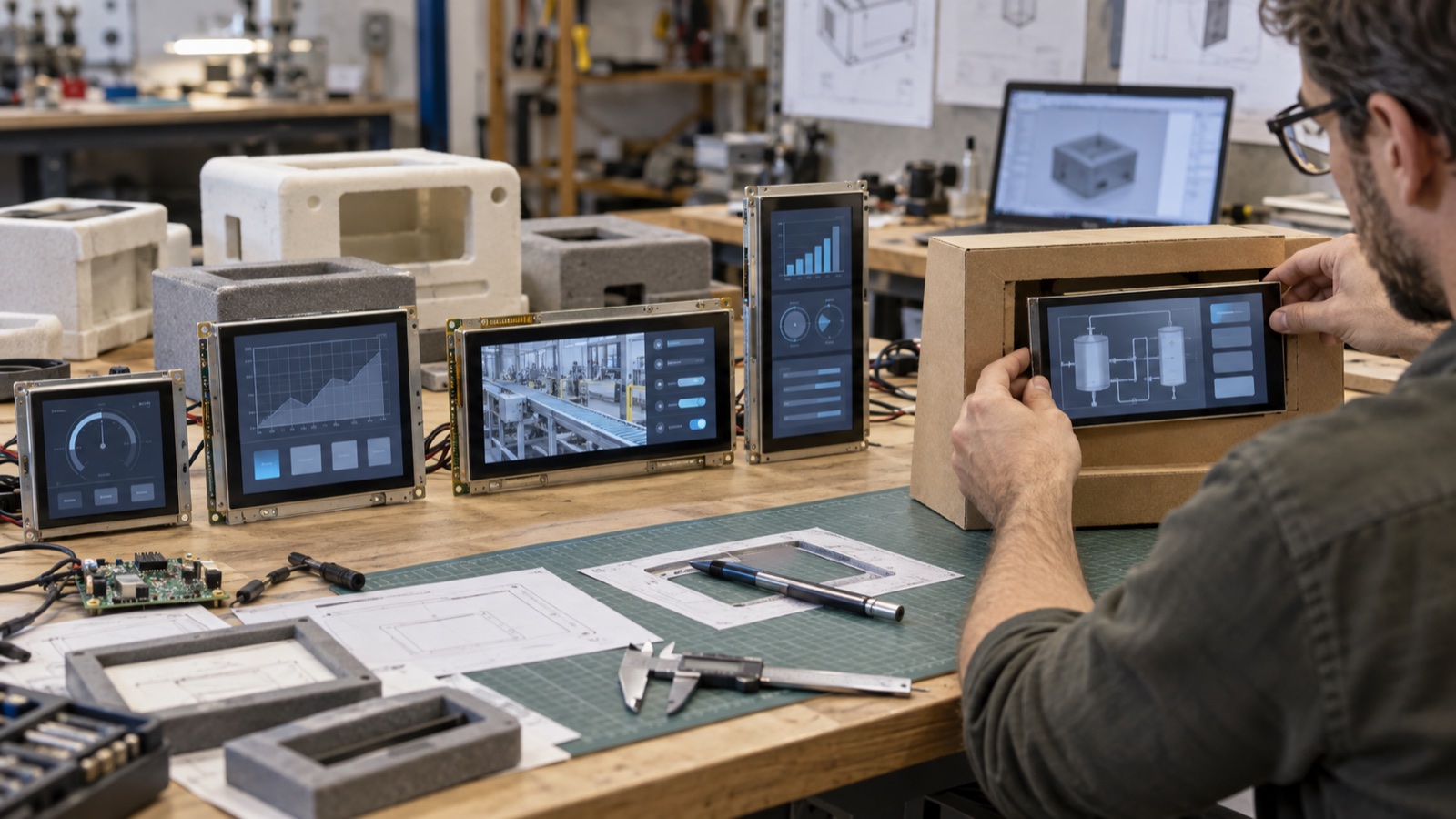
Display aspect ratio is often treated as a styling choice: widescreen looks modern, square looks specialized, and portrait looks like a rotated phone. In an industrial product, the decision reaches much further. It affects enclosure proportions, touch layout, camera or video scaling, PCB placement, cable routing, software reuse, and the number of viable replacement panels five years later.
The best format is the one that gives the application’s most important content a natural home. Start with the information and the user’s reach, then confirm that the processor and supply chain can support the result.
Aspect ratio describes shape, not size
Aspect ratio is the relationship between display width and height:
aspect ratio = horizontal pixels / vertical pixels
A 1920×1080 panel is 16:9 because both numbers reduce to that proportion. A 1280×800 panel is 16:10. A 1024×768 panel is 4:3. A 480×480 panel is 1:1.
The ratio describes the active image shape. It does not state diagonal size, pixel density, brightness, viewing angle, or touch performance. A small 4.3-inch widescreen and a 15.6-inch widescreen share a ratio but serve very different tasks.
Begin with a content inventory
List what must appear during normal operation and during faults. Typical elements include:
- Persistent navigation.
- Primary process values.
- Alarm banner and acknowledgment controls.
- Trend graph or waveform.
- Camera, map, or diagram.
- On-screen keypad.
- Service diagnostics.
- Language-dependent labels.
Next, rank these elements. If a camera view must remain large while controls stay visible, a wide format may be efficient. If the operator mainly moves through forms and vertically stacked status cards, extra height may be worth more than width. If a central instrument is surrounded by a few controls, square can be remarkably space-efficient.
A layout that works only with perfect data is not finished. Populate it with long translations, four-digit error codes, active alarms, disconnected states, and the on-screen keyboard.
4:3 and 5:4: useful vertical space in a compact panel
Traditional industrial HMIs often use 4:3 or 5:4 because the shape fits machine panels, control cabinets, and grid-based interfaces. These formats leave more vertical space than 16:9 at a similar width.
They suit:
- Forms with several labeled rows.
- Process diagrams with equipment arranged in both axes.
- Four-quadrant dashboards.
- Retrofits into older panel cutouts.
- Interfaces that need persistent top and bottom status areas.
The main risk is ecosystem depth. Some 4:3 resolutions remain common, while others have fewer modern IPS, high-brightness, or touch-integrated choices. Confirm the actual supplier roadmap rather than assuming an older format will always be easier to source.
16:9: strong availability for video and horizontal layouts
The 16:9 format aligns naturally with common video and many application-processor output modes. It works well for:
- Camera previews.
- Maps and timelines.
- Side-by-side panes.
- Wide trend graphs.
- Vehicle-style dashboards.
- Larger HMIs viewed from a distance.
A 15.6-inch full-HD industrial panel is a natural candidate when a product needs a large camera view or several horizontal work areas. The same ratio can feel cramped on a small screen if a vertical menu consumes too much width.
Do not choose 16:9 simply because it looks current. A narrow control cabinet may force the display to become shorter than the touch layout needs, while unused width accumulates beside simple numeric values.
16:10: a practical compromise for embedded HMIs
Compared with 16:9, a 16:10 screen has additional vertical room without giving up the benefits of a widescreen layout. Resolutions such as 1280×800 and 1920×1200 are common in embedded and industrial designs.
That extra height helps when the UI combines:
- A title or alarm region at the top.
- A persistent navigation bar.
- A central chart, image, or process view.
- Soft keys along the bottom.
The 10.1-inch 1920×1200 IPS format illustrates why 16:10 is attractive for detailed dashboards: the content area remains wide, but it does not feel as vertically compressed as 16:9.
Square displays solve real packaging problems
Square displays are not merely decorative. A 1:1 active area can fit products where a long rectangular panel would waste enclosure volume or interfere with controls.
Useful applications include:
- Compact controllers with a rotary encoder below the screen.
- Charging interfaces and access-control terminals.
- Instrument clusters.
- Circular or symmetric product faces.
- Devices used equally in multiple orientations.
A 4-inch 480×480 IPS module provides a straightforward square canvas, while a compact 3.46-inch square display can suit dense front panels. The UI should be designed for the square from the start; cropping a widescreen design usually leaves weak hierarchy and awkward empty areas.
Portrait is a product orientation, not only a rotated file
Portrait mounting is useful for lists, access-control terminals, medical carts, narrow columns, and step-by-step workflows. Rotation changes more than the rendering transform.
Check:
- Whether the LCD viewing performance is symmetric after rotation.
- Polarizer behavior with sunglasses.
- Cable-exit direction and bend radius.
- Touch-controller coordinate mapping.
- Boot logo, recovery screen, and BIOS orientation.
- GPU or display-controller rotation support.
- Memory bandwidth if rotation requires an extra composition pass.
- Thermal behavior when the backlight and control board move relative to vents.
The panel’s native scan direction can also affect tearing or motion artifacts. Test moving content in the installed orientation instead of assuming landscape and portrait are equivalent.
Active area matters more than diagonal alone
Panels with the same diagonal but different aspect ratios have different widths and heights. If diagonal D and aspect ratio W:H are known:
active width  ≈ D × W / √(W² + H²)
active height ≈ D × H / √(W² + H²)
For a nominal 10.1-inch diagonal:
| Ratio | Approx. width | Approx. height |
|---|---|---|
| 4:3 | 8.08 in | 6.06 in |
| 16:10 | 8.57 in | 5.36 in |
| 16:9 | 8.80 in | 4.95 in |
These calculations are planning estimates. The mechanical drawing governs the real active area, bezel, outline, and tolerances.
Match the source content to avoid scaling damage
If the source output and panel aspect ratios differ, the system must choose among:
- Letterboxing: preserve all content and add unused bands.
- Cropping: fill the screen but remove content at the edges.
- Stretching: fill the screen while distorting geometry.
- Re-layout: rearrange the UI for the target shape.
Re-layout is normally best for a native HMI. Video and third-party applications may not allow it. When the product must display a 16:9 camera feed on a 4:3 screen, decide whether controls occupy the remaining region or whether black bars are acceptable.
Scaling also affects small text and one-pixel lines. A non-integer scale can soften edges or make grid lines uneven. Use native-resolution captures during review.
Touch ergonomics can reverse the visual preference
A wide screen can display more side-by-side controls, but those controls may fall outside comfortable reach on a wall-mounted product. A portrait screen may keep options closer to the hand while creating a longer vertical reach.
Build a full-size front-panel mockup and ask users to perform common actions. Include the bezel because a deep or raised edge can make controls near the perimeter harder to touch. Physical button size should be checked alongside display resolution and PPI requirements, otherwise the same pixel-based UI can change physical size between candidate panels.
Enclosure and internal layout must be reviewed together
Aspect ratio changes the entire front stack:
- Window and gasket geometry.
- Cover-glass strength and unsupported spans.
- Touch-sensor tail position.
- Display FPC exit direction.
- Main-board placement.
- Speaker, camera, LED, and hard-key locations.
- Heat spreading and vent locations.
A panel that fits the front opening may still create a poor cable path. Use the exact 2D drawing and a simple cable model before committing to tooling. The early display interface and enclosure planning process is especially important when a new ratio moves the connector to another edge.
Supply-chain depth should influence the choice
An aspect ratio is safer when several manufacturers and interface variants exist in the required size and temperature class. During sourcing, ask:
- How many active panel families use this outline and ratio?
- Are IPS, touch, and high-brightness versions available?
- Does the resolution require a bridge IC on the chosen processor?
- Can a replacement fit without changing the cover-glass opening?
- Which dimensions are custom and which follow a common market format?
- Is the quoted module based on one cell source or multiple qualified sources?
Do not mistake a familiar ratio for a drop-in standard. Connector, timing, outline, active-area position, and initialization can still differ.
A decision matrix for common product types
| Product need | Formats worth evaluating | Reason |
|---|---|---|
| Camera or video terminal | 16:9, 16:10 | Natural media fit and horizontal controls |
| Machine control retrofit | 4:3, 5:4 | Vertical workspace and legacy cutouts |
| Compact controller | 1:1, 4:3 | Efficient front-panel packaging |
| Detailed diagnostic HMI | 16:10 | Width plus useful vertical room |
| Narrow access terminal | Portrait 16:9 or 16:10 | Lists, keypad, and constrained width |
| Large dashboard | 16:9 | Multiple panes and longer viewing distance |
Treat this as a shortlist, not a rule. The actual workflow and installation can point elsewhere.
Prototype the format before selecting the module
- Draw the enclosure opening at full size.
- Place the real UI in the active area, including worst-case text.
- Test normal, alarm, service, and boot screens.
- Confirm physical touch-target sizes.
- Add camera or video content using the real source ratio.
- Rotate the mockup if portrait use is possible.
- Review cable exit and assembly sequence.
- Compare at least two panel families for supply resilience.
A printed mockup is useful; a native-resolution prototype is better. The final approval should use the intended cover lens and touch stack.
Choose the shape that removes compromises
The right aspect ratio is not the one with the most fashionable silhouette. It is the shape that lets critical content remain clear, keeps controls physically usable, fits the enclosure without a fragile cable route, and has enough supply depth for the product’s service life.
Document the decision as part of the industrial display mechanical and interface checklist. That makes it easier to evaluate future panel substitutions without reopening every UI and enclosure question.
FAQ
Is 16:9 always the easiest industrial display format to source?
It is common in many sizes, especially for video-oriented products, but availability still depends on diagonal, brightness, interface, temperature range, and lifecycle requirements.
Can a landscape LCD be mounted in portrait?
Often yes, but viewing angle, polarization, scan behavior, cable position, touch mapping, rotation bandwidth, and boot screens must be verified.
Is 16:10 better than 16:9 for an HMI?
It often provides useful vertical space for navigation and alarms. A video-first product may benefit more from 16:9, while a compact instrument may fit 4:3 or square better.
Does changing aspect ratio require new software?
Usually some layout work is required. Scaling alone can create unused space, distortion, soft text, or physically undersized controls.
Technical reference
- Microsoft guidance on adaptive layouts and effective pixels — illustrates why content should respond to available shape and viewing conditions instead of relying on raw resolution alone.